Controlling a USB missile launcher over HTTP with FastAPI and Docker
The rule was simple: whoever breaks the CI build owes the team a coffee. It worked fine for a while. Then someone suggested we needed something with more immediate feedback. Something physical. Something that fires.
A Dream Cheeky Thunder appeared on a desk shortly after. Four foam missiles, a USB cable, and a very clear team consensus: hook it to the cluster, wire it to the build pipeline, and let the CI decide who deserves a volley.
The launcher needed to respond to HTTP calls from anywhere on the network. No driver, no GUI, no manual aiming. Just an endpoint that makes it shoot in the direction of the guilty party’s desk.
This is the story of dream-cheeky-thunder.
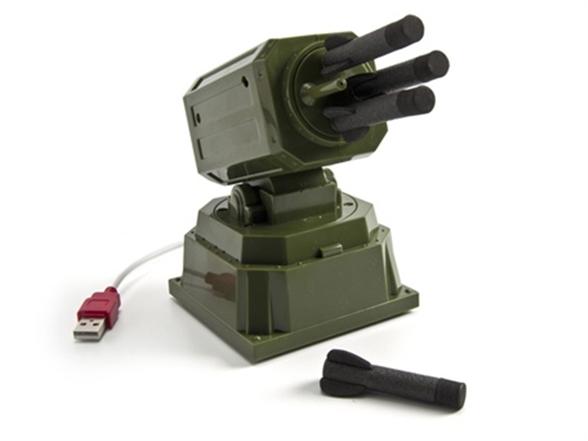
 No SDK, no docs, no problem
Dream Cheeky never published a protocol spec. The launcher speaks raw USB HID, and the only starting point was a vendored Python script from 2012 floating around in forum threads. Vendor ID 0x2123, product ID 0x1010, and a handful of control bytes that someone had reverse engineered years before.
That was enough. The protocol is simple: send a byte sequence to move the motors, send another to fire. The tricky part is that the launcher has no position feedback. No encoders, no limit switches beyond the physical hard stops at the extremes. You drive it blind.
 From USB to HTTP
The CI pipeline needed to trigger the launcher over the network. A local script wasn’t going to cut it — the launcher had to be reachable from any machine on the cluster, including the build server. So: a REST API.
FastAPI was the obvious choice. The targeting flow from the CI side ends up being three HTTP calls:
curl -X POST http://localhost:8000/park      # reset to known position
curl -X POST http://localhost:8000/yaw/20    # rotate toward guilty desk
curl -X POST "http://localhost:8000/fire?shots=2"
The /park call matters more than it looks. Since the launcher has no position feedback, the server estimates the current angle by tracking how long the motors have been running. That estimate drifts. Bumping the hardware, interrupting a command, or just the imprecision of time-based tracking — they all accumulate. Parking drives both motors against the physical hard stops at full sweep, which guarantees alignment regardless of what the server thinks it knows. Skip it, and your aim is a guess.
The full API reference is in the repo. There’s also a web UI if you prefer clicking over curl.
 Docker knows nothing about USB
Running this in a Docker container on the cluster was where the fun really started: containers don’t see USB devices by default.
The devices mount in compose.yaml exposes the USB bus to the container:
devices:
  - /dev/bus/usb:/dev/bus/usb
Not enough. First run came back with USBError: [Errno 13] Access denied. The device node is there inside the container, but it inherits permissions from the host, and on the host only root can open it by default.
The fix is a udev rule. Drop one file into /etc/udev/rules.d/, and the kernel sets the right group and permissions when the device plugs in. After that, the container user can open it without needing elevated privileges. The rule ships with the project, setup instructions are in the docs.
 WSL2 made it interesting
Half the team runs Windows with Docker Desktop on WSL2. That’s where things got creative.
WSL2 has no access to USB devices by default: the Windows kernel holds them, and the devices mount alone does nothing because WSL2 simply doesn’t see the hardware. The fix is usbipd-win, which forwards the USB device from Windows into the WSL2 kernel over IP. Once that’s done, the Linux path works exactly the same: udev rule, devices mount, done.
The attachment doesn’t survive reboots, though. usbipd v4+ added a policy mechanism that automates reconnection, which killed the “it worked yesterday” mystery that had been annoying us for days.
 What actually surprised us
 Time-based positioning works well enough. No encoders meant we went in expecting the angle tracking to be basically useless. Turns out, parking before every sequence kept it accurate enough to reliably aim at a specific desk. Not millimeter precision, but foam missile precision is fine.
 The
The devices mount is necessary but not sufficient. The permission error was confusing precisely because the device was clearly visible inside the container. The udev rule is the bit most tutorials quietly skip.
 The coffee rule was never the same after this. Once the launcher was wired to the pipeline, broken builds suddenly became a lot more motivating to fix.
 guillaumedelre/dream-cheeky-thunder
FastAPI + Docker + PyUSB — HTTP control for the Dream Cheeky Thunder USB missile launcher. Pull requests welcome, especially if you have a better angle calibration approach.